TABLE OF CONTENTS
2. How to Logout of algoQA Platform
1. Overview
This article provides the steps to log out of the algoQA Platform. Logging out ensures that your personal information, projects, and account details are protected from unauthorized access.
2. How to Logout of algoQA Platform
Perform the following to log out of the algoQA platform and end your session:
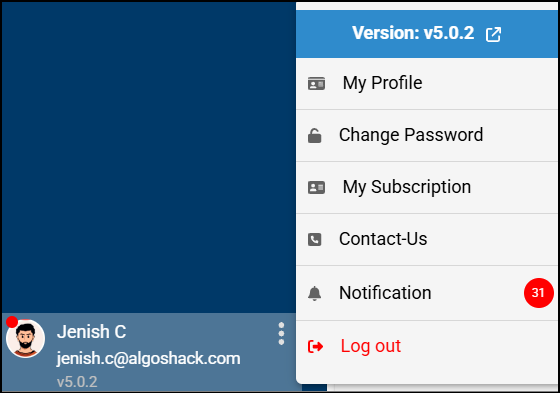
- In algoQA, find your Profile Name or picture in the bottom-left corner.
- After clicking your name, pop-up menu appears.
- Select Log Out from the pop-up menu. Here, you can also view the current version of algoQA.
- A confirmation message appears on the upper-right corner of the screen, indicating that you have logged out of the algoQA Platform.
- A warning pop-up appears prompting you to save your changes if you try to navigate to a different screen without saving.
Was this article helpful?
That’s Great!
Thank you for your feedback
Sorry! We couldn't be helpful
Thank you for your feedback
Feedback sent
We appreciate your effort and will try to fix the article